
For business, an AI agent becomes interesting not when it “thinks” nicely in a chat. Its value appears when it quietly and reliably gets the work done: finds a record in CRM, drafts a customer reply, updates a spreadsheet, and triggers the next step in a process. And when the owner or operations manager can see exactly what happened and how much it cost.
That’s why Zapier’s announcement looks less like a cosmetic rebrand and more like a meaningful shift. As Zapier Blog explains, the functionality of Zapier Agents has been moved into AI by Zapier. It now works as a single AI step inside a regular Zap. In other words, the agent no longer lives on a separate island; it is built directly into the standard automation flow.
The AI agent has moved into the Zap editor, where processes already live
Previously, Zapier Agents consisted of four parts: a prompt, a set of tools, a trigger, and permission to act. The setup worked, but it had an annoying limitation. The agent sat outside Zapier’s main platform and could not properly use triggers, filters, paths, or Zap run history.
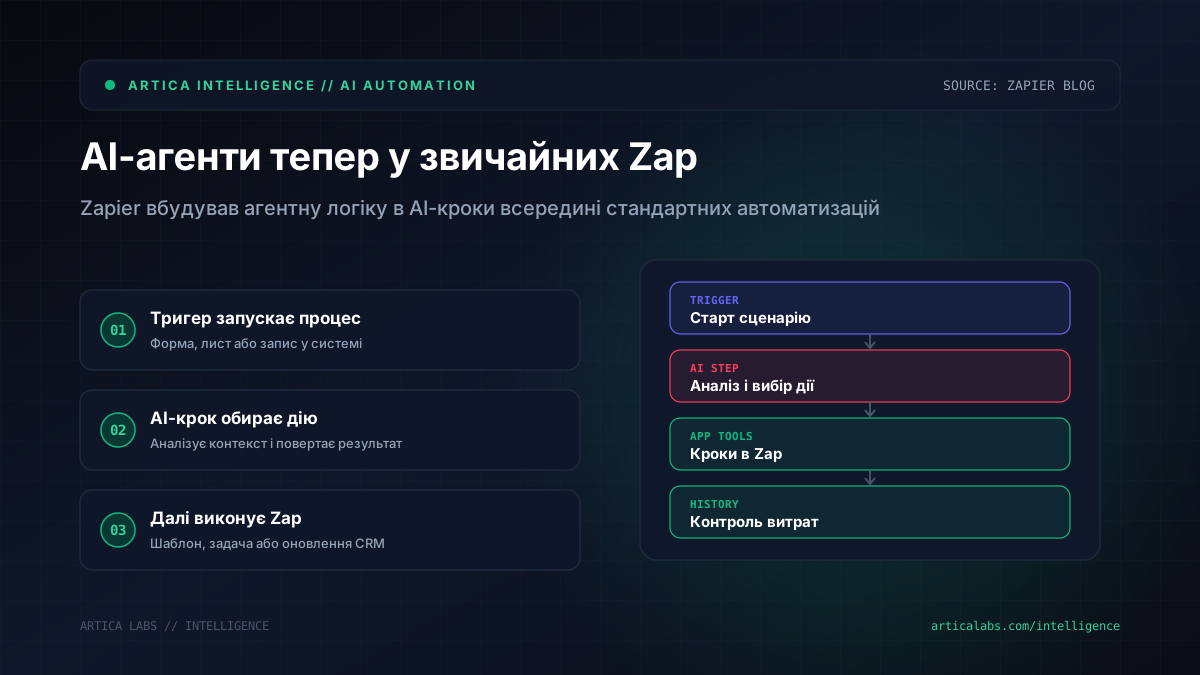
Now those same building blocks are available in AI by Zapier as a step inside the Zap editor. For business users, the logic is much simpler. First, a normal trigger fires: a new form submission, an email, a spreadsheet row, or an event from one of more than 9,000 integrated apps. Then the AI step analyzes the situation, chooses a tool, returns a structured result, and the following Zap steps carry out the next actions in a clearly defined way.
And that’s where it gets interesting. Zapier lets you combine agent-like logic with deterministic steps. Imagine an online store receiving a customer request. AI identifies the type of issue and the tone, while the regular Zap sends a response based on an approved template or creates a task for a manager. Wherever stability matters, there is less room for model “creativity.”
Permissions and costs are now easier to control
In Zapier Agents, permissions were fairly blunt: the agent either could act or it couldn’t. In AI by Zapier, confirmations can be turned on separately for each tool. That is much closer to how businesses actually work. For example, you can allow automatic reading of spreadsheet data, but require manual approval before sending a message to a customer or changing a CRM record.
For a clinic, that could be the difference between safely analyzing incoming requests and risking an automated conversation with a patient. For an agency, it could mean sorting leads versus accidentally sending a proposal to the wrong contact.
Costs are also more transparent now. AI steps are counted as tasks in Zapier’s overall system. According to Zapier Blog, standard, advanced, and premium model tiers have different pricing: an AI step may cost 1, 3, or 5 tasks. You can also choose a specific model. In Zap History, you can see which tools were called, what inputs and outputs were involved, which model tier was used, and how many tasks were consumed.
Zapier also added a safeguard for cases when an agent starts running too far. If a single run exceeds 75 tasks, it is paused for human review. In the future, Zapier says this limit will become configurable.
We would start not with a major overhaul, but with one clear process. For example, with lead classification or drafting reply templates. Riskier actions are better left with manual approval: customer emails, payments, CRM changes. For an AI step, it is worth defining a structured output right away — say, category, priority, email subject, and next action. And after the first runs, check Zap History instead of waiting for the bill at the end of the billing period.
Migration does not mean “move everything as is”
There are also limitations. Not all knowledge sources are supported in AI by Zapier yet. The source mentions HubSpot, Asana, Zendesk, Zoom, and Jira as currently unavailable for this scenario. So before migrating, you should check what data your agent actually depended on.
If you already used Zapier Agents, you won’t have to rebuild everything from scratch. Zapier offers to recreate the agent as an AI step in a Zap, and eligible agents should show a banner with a link to the migration guide.
Still, we would not move everything mechanically. This is a good moment to look at the process with fresh eyes: where AI should truly reason, and where the business needs a simple, predictable step. Because automation is useful not when it looks smart, but when it doesn’t create extra work for people.